
JsonUtility
一、Unity自带的Json库
官方API:https://docs.unity3d.com/ScriptReference/JsonUtility.html
在Unity中使用JsonUtility类对Json进行解析,此类包含三个重要方法,下面进行详解。

二、FromJson方法(反序列化)
将Json转换为object
返回值是一个Object,需要在对应的类或结构体前标记Serializable属性(没标记好像也行 序列化不成功可能就是因为没有标记)。object类型必须支持序列化,其中的字段也必须支持序列化(比如私有类型、标记了NonSerialized属性的类型等不可序列化字段会被忽视)。
只有普通的类/结构体才行, 继承自UnityEngine.Object (比如 MonoBehaviour 或 ScriptableObject)的类则不行。
使用string的此函数可以在后台线程调用,但使用TextAsset的此函数只可以在主线程调用。
using UnityEngine;

[System.Serializable]
public class PlayerInfo
{
    public string name;
    public int lives;
    public float health;

    public static PlayerInfo CreateFromJSON(string jsonString)
    {
        return JsonUtility.FromJson<PlayerInfo>(jsonString);
    }

    // Given JSON input:
    // {"name":"Dr Charles","lives":3,"health":0.8}
    // this example will return a PlayerInfo object with
    // name == "Dr Charles", lives == 3, and health == 0.8f.
}
三、ToJson(序列化)
将object转换为Json
| obj | 要转换为Json的object |
|---|---|
| prettyPrint | 如果为true,则格式化输出以确保可读性。如果为false,则将输出格式化为最小大小。默认值为false。 |
返回值是json格式的string。
传入的object必须是支持序列化的:这个object必须继承自MonoBehaviour、ScriptableObject(其他引擎类型使用EditorJsonUtility.Tojson),或者是标记Serializable属性的普通类/结构体。想要包含的字段也必须是支持序列化的,不支持序列化的字段如private、static以及标记了NonSerialized属性的字段等会被忽略。
传入的object不能是基本数据类型如int,float,也不能为数组。想要序列化基本数据类型或者数组,就需要将它们写入一个类或结构体中,再将类/结构体实例化的对象传入即可。
| 直接传入一个数组,序列化失败 | 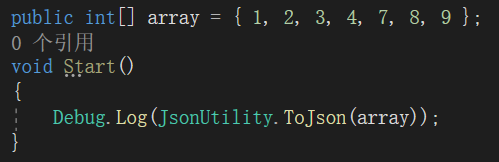 |  |
|---|---|---|
| 将数组写进类中,将类实例化对象传入,序列化成功 |  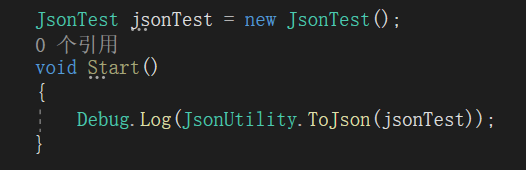 |  |
此函数可以在后台线程中执行,但此函数执行过程中不要去修改传入的object的值。
四、FromJsonOverwrite
此函数和FromJson非常类似,只有一点不同:此函数要把Json中的数据读入一个已经存在的对象中,覆盖该对象原来的数据。(FromJson是返回一个新创建的对象)
五、遇到不支持序列化的类型怎么办?
JsonUtilty类能力有限,并不能序列化/反序列化所有类型的数据,比如字典类型。这个时候就要实现Unity提供给我们的一个接口:ISerializationCallbackReceiver
具体说明见官方文档:https://docs.unity3d.com/cn/current/ScriptReference/ISerializationCallbackReceiver.html
Unity中Json库性能对比测试
类库大小对比:
| 类库 | 文件类型 | 大小 |
|---|---|---|
| NewtonsoftJson | .dll | 353KB |
| LitJson | .dll | 56KB |
| SimpleJSON | .cs | 68KB |
解析时间对比:
执行次数:10000次
| 测试方法 | NewtonsoftJson | LitJson | SimpleJSON |
|---|---|---|---|
| 测试1 | 114ms | 158ms | 52ms |
| 测试2 | 136ms | 288ms | 126ms |
| 测试3 | 263ms | 542ms | 169ms |
| 测试4 | 333ms | 747ms | 200ms |
测试代码:
using UnityEngine;
using System.Diagnostics;
using LitJson;
using SimpleJSON;
using Newtonsoft.Json.Linq;

/// <summary>
/// JsonTest
/// ZhangYu 2019-07-11
/// <para>Blog:https://segmentfault.com/a/1190000019731298</para>
/// </summary>
public class JsonTest : MonoBehaviour {

    public int count = 10000;
    private Stopwatch watch;

    private void Start () {
        watch = new Stopwatch();

        string json1 = "{\"id\":10001,\"name\":\"test\"}";
        string json2 = "[1,2,3,4,5,6,7,8,9,10]";
        string json3 = "{\"id\":10000,\"username\":\"zhangyu\",\"password\":\"123456\",\"nickname\":\"冰封百度\",\"age\":20,\"gender\":1,\"phone\":12345678910,\"email\":\"zhangyu@xx.com\"}";
        string json4 = "[\"test2\",[[\"key1\",    \"id\"],[\"key2\",    \"hp\"],[\"key3\",    \"mp\"],[\"key4\",    \"exp\"],[\"key5\",    \"money\"],[\"key6\",    \"point\"],[\"key7\",    \"age\"],[\"key8\",    \"sex\"]]]";

        JsonParseTest(json1);
        JsonParseTest(json2);
        JsonParseTest(json3);
        JsonParseTest(json4);
    }

    private void JsonParseTest(string json) {
        print("json:" + json);
        bool isArray = json[0] == '[';
        NewtonsoftJsonTest(json, isArray);
        LiteJsonTest(json);
        SimpleJsonTest(json);
        print("======================");
    }

    private void NewtonsoftJsonTest(string json, bool isArray) {
        watch.Reset();
        watch.Start();
        if (isArray) {
            for (int i = 0; i < count; i++) {
                JArray jArray = JArray.Parse(json);
            }
        } else {
            for (int i = 0; i < count; i++) {
                JObject jObj = JObject.Parse(json);
            }
        }
        watch.Stop();
        print("NewtonsoftJson Parse Time(ms):" + watch.ElapsedMilliseconds);
    }

    private void LiteJsonTest(string json) {
        watch.Reset();
        watch.Start();
        for (int i = 0; i < count; i++) {
            JsonData jData = JsonMapper.ToObject(json);
        }
        watch.Stop();
        print("LiteJson Parse Time(ms):" + watch.ElapsedMilliseconds);
    }

    private void SimpleJsonTest(string json) {
        watch.Reset();
        watch.Start();
        for (int i = 0; i < count; i++) {
            JSONNode jNode = JSON.Parse(json);
        }
        watch.Stop();
        print("SimpleJson Parse Time(ms):" + watch.ElapsedMilliseconds);
    }

}
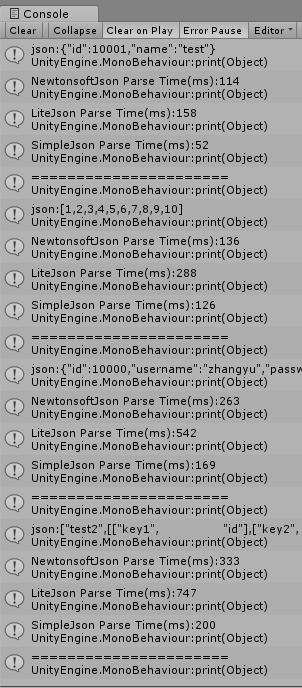
结论:
SimpleJSON获胜! SimpleJSON以体积最小,速度最快,集成最容易的优势胜出 SimpleJSON针对Unity在持续优化,更新较快,而且体积小,速度快,有源码,推荐SimpleJSON NewtonsoftJson因为体积太大被淘汰,按理来说,这么大的类库肯定支持更多功能,可惜现有的项目并没有太过复杂的json,无法检验。 LitJson体积也小巧,使用也很方便,可惜速度完全没有优势。
NewtonsoftJson使用
正好项目中用到了所以就以Newtonsoft.Json为例子,更多功能看官方文档吧。
官方文档:https://www.newtonsoft.com/json。
对于要在 JSON 字符串之间进行转换的简单场景, SerializeObject和 反序列化对象 JsonConvert 上的方法为 JsonSerializer 提供了一个易于使用的包装器。
Product product = new Product();

product.Name = "Apple";
product.ExpiryDate = new DateTime(2008, 12, 28);
product.Price = 3.99M;
product.Sizes = new string[] { "Small", "Medium", "Large" };

string output = JsonConvert.SerializeObject(product);
//{
//  "Name": "Apple",
//  "ExpiryDate": "2008-12-28T00:00:00",
//  "Price": 3.99,
//  "Sizes": [
//    "Small",
//    "Medium",
//    "Large"
//  ]
//}

Product deserializedProduct = JsonConvert.DeserializeObject<Product>(output);
SerializeObject 和 DeserializeObject 都具有采用JsonSerializerSettings对象的重载。JsonSerializerSettings 允许您使用下面列出的许多 JsonSerializer 设置,同时仍然使用简单的序列化方法。
为了更好地控制对象的序列化方式,可以直接使用JsonSerializer 。JsonSerializer 能够通过JsonTextReader 和JsonTextWriter直接读取 JSON 文本并将其写入流。也可以使用其他类型的 JsonWriters,例如 JTokenReader / JTokenWriter将您的对象与 LINQ 对象转换为 JSON 对象,或 BsonReader / BsonWriter用于与 BSON 进行转换。
使用 JsonSerializer 将 JSON 序列化为流
Product product = new Product();
product.ExpiryDate = new DateTime(2008, 12, 28);

JsonSerializer serializer = new JsonSerializer();
serializer.Converters.Add(new JavaScriptDateTimeConverter());
serializer.NullValueHandling = NullValueHandling.Ignore;

using (StreamWriter sw = new StreamWriter(@"c:\json.txt"))
using (JsonWriter writer = new JsonTextWriter(sw))
{
    serializer.Serialize(writer, product);
    // {"ExpiryDate":new Date(1230375600000),"Price":0}
}
JsonSerializer 上有许多属性来自定义它如何序列化 JSON。这些也可以通过 JsonSerializerSettings 重载与 JsonConvert 上的方法一起使用。
反序列化部分Json
public class SearchResult
{
    public string Title { get; set; }
    public string Content { get; set; }
    public string Url { get; set; }
}

string googleSearchText = @"{
  'responseData': {
    'results': [
      {
        'GsearchResultClass': 'GwebSearch',
        'unescapedUrl': 'http://en.wikipedia.org/wiki/Paris_Hilton',
        'url': 'http://en.wikipedia.org/wiki/Paris_Hilton',
        'visibleUrl': 'en.wikipedia.org',
        'cacheUrl': 'http://www.google.com/search?q=cache:TwrPfhd22hYJ:en.wikipedia.org',
        'title': '<b>Paris Hilton</b> - Wikipedia, the free encyclopedia',
        'titleNoFormatting': 'Paris Hilton - Wikipedia, the free encyclopedia',
        'content': '[1] In 2006, she released her debut album...'
      },
      {
        'GsearchResultClass': 'GwebSearch',
        'unescapedUrl': 'http://www.imdb.com/name/nm0385296/',
        'url': 'http://www.imdb.com/name/nm0385296/',
        'visibleUrl': 'www.imdb.com',
        'cacheUrl': 'http://www.google.com/search?q=cache:1i34KkqnsooJ:www.imdb.com',
        'title': '<b>Paris Hilton</b>',
        'titleNoFormatting': 'Paris Hilton',
        'content': 'Self: Zoolander. Socialite <b>Paris Hilton</b>...'
      }
    ],
    'cursor': {
      'pages': [
        {
          'start': '0',
          'label': 1
        },
        {
          'start': '4',
          'label': 2
        },
        {
          'start': '8',
          'label': 3
        },
        {
          'start': '12',
          'label': 4
        }
      ],
      'estimatedResultCount': '59600000',
      'currentPageIndex': 0,
      'moreResultsUrl': 'http://www.google.com/search?oe=utf8&ie=utf8...'
    }
  },
  'responseDetails': null,
  'responseStatus': 200
}";

JObject googleSearch = JObject.Parse(googleSearchText);

// get JSON result objects into a list
IList<JToken> results = googleSearch["responseData"]["results"].Children().ToList();

// serialize JSON results into .NET objects
IList<SearchResult> searchResults = new List<SearchResult>();
foreach (JToken result in results)
{
    // JToken.ToObject is a helper method that uses JsonSerializer internally
    SearchResult searchResult = result.ToObject<SearchResult>();
    searchResults.Add(searchResult);
}

// Title = <b>Paris Hilton</b> - Wikipedia, the free encyclopedia
// Content = [1] In 2006, she released her debut album...
// Url = http://en.wikipedia.org/wiki/Paris_Hilton

// Title = <b>Paris Hilton</b>
// Content = Self: Zoolander. Socialite <b>Paris Hilton</b>...
// Url = http://www.imdb.com/name/nm0385296/